
Latex manuscript preparation
To submit on on HAL/ArXiv, it is mandatory to prepare sources as HAL will use tex sources to compile the PDF. Same for ArXiv with another constraint: ArXiv will share the latex sources (tex, images, …). One do not want to share all comments within the latex source, and all unused files within the folder explaining usage of arxiv_latex_cleaner. See here for documentation about the transfer from HAL to ArXiv: https://doc.hal.science/deposer/transfert-hal-arxiv/.
Arxiv-latex-cleaner installation
Firs of all, we need to install arxiv-latex-cleaner. This tools is an open source software from Google dedicated to clean your latex sources. It is also able to resize image to avoid having too big PDF. To install it, several options are available.
Option 1: python virtual environment
On can use python virtual environment (venv) to install and use arxiv-latex-cleaner. First, you can create the venv:
python -m venv path/to/arxiv-latex-cleaner.venv
then, you can activate it, under Linux/Mac OSX:
path/to/arxiv-latex-cleaner.venv/bin/activate.sh
Using Windows:
path\to\arxiv-latex-cleaner.venv\Scripts\activate.bat
Last one can install arxiv-latex-cleaner:
pip install arxiv-latex-cleaner
Option 2: conda installation
If you have conda installed and enabled (this document do not present the way to install conda), your can create a new environment with pip inside:
conda create arxiv-latex-cleaner pip
then, you can activate it using:
conda activate arxiv-latex-cleaner
Last to install arxiv-latex-cleaner inside this environment:
pip install arxiv-latex-cleaner
Option 3: UV installation
On can use uv to create python virtual environment (venv). First, you can create the venv:
uv venv path/to/arxiv-latex-cleaner.venv
then, you can activate it, under Linux/Mac OSX:
path/to/arxiv-latex-cleaner.venv/bin/activate.sh
Using Windows:
path\to\arxiv-latex-cleaner.venv\Scripts\activate.bat
Last one can install arxiv-latex-cleaner:
uv pip install arxiv-latex-cleaner
Test of arxiv-latex-cleaner installation
You can check that arxiv-latex-cleaner is successfully installed by launching (within a shell where you activated your python envronment):
arxiv_latex_cleaner --help
Prepare the Latex sources
TIP: Rename the main source file in your repository to something other than main.tex or source.tex. The output pdf file will have this name after compilation.
Change style of your publication
Most of format provided by conferences, journalx are legaly protected (I do not discuss the legal protection of this in regards to French/European laws here). One must not use them to share a publication using HAL/ArXiv. One can use the M-PSI ArXiv style to do so (see instructions and class here: https://plmlatex.math.cnrs.fr/read/nsztrhczxvgq) or any free style available.
Check your bibliography
The bibliography is not always taken as seriously as it deserves to be when writing an article. Here is a proposed checked list:
- Make sure no references are missing (searching for “?” in your document allows you to check this without looking at the logs)
- Make sure there are no first-name/last-name reversals in the BibTeX, which cause incorrect rendering (e.g., V. Dominique instead of D. Vaufreydaz)
- If LaTeX or your editor shows warnings regarding your BibTeX content, you must correct them (missing location, etc.)
- More and more articles are first posted on open-access repositories like ArXiv and then published (in conference proceedings or journals), which is not a bad practice. An article on ArXiv has not been peer-reviewed and should not carry the same weight as an article in a conference proceedings or a journal: publishing on ArXiv allows quick “publication” but there is no guarantee of high-quality publication. This does not necessarily impact the article’s quality. Therefore, for each ArXiv reference, you must check and correct the BibTeX if there is a version of the article that was submitted to and published in a conference or journal
- Finally, check the “References” section of your article to ensure there are no inconsistencies (verify that the DOI links are correct, the same for web links, that no reference renders in an unusual way, etc.).
Download source in a folder (if written on overleaf or pmlatex)
Prepare the source of your folder in a local folder SOURCE_FOLDER. You can download the source in a zip, and unzip it on your local hard drive. Then, to be able to push on ArXiv, we need the generated bbl file. You must have compiled your latex source recently. Once done, you can get the file:
 |
 |
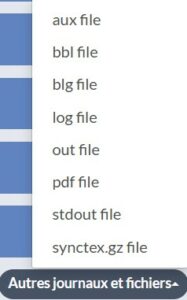
Click on the “log and output files” just nearby the compile button. Then, go down of the log page and click on the button to get the bbl file using the menu:
 |
 |
IMPORTANT: Add this file to the local folder containing your latex sources renaming it with the same name of your main latex source file. If you main file is MyNewArticle.tex, your bbl must be MyNewArticle.bbl.
Pass your source code though arxiv_latex_cleaner
To remove all comments from you latex source, remove unused files and potentialy resize images on-the-fly, you can use the following command (after activating the former python environment):
arxiv_latex_cleaner --keep_bib SOURCE_FOLDER
This command will produce a SOURCE_FOLDER_arxiv folder containing the final source including the bbl file. Note, you can use –help to see check for other options (image resizing, latex custom command removing, …).
Prepare the zip file to upload
To finish preparing the source folder, you must prepare a zip of it. IMPORTANT: you must not zip the folder itself, but zip its content, i.e. when listing files inside the zip archive you must not see the folder, but directly the files inside it.
Upload it to HAL, pushing it automatically on ArXiv
First upload
Connect to hal.science. Create a new publication deposit. If you publication is not aleady accepted, you can choose preprint (you will be able to chainge it later). If it is an author version of a published article, select the right type (conference, journal, …). Then follow these steps:
- Upload the zip file. Once done, click on uncompress/décompresser link under the file. You must see the whole archive content. For all elements, select they are part of the source (important if you have images as pdf).
- Using the action button, click on Latex compilation. You must wait and then, you get the compile document and le the log. If you got only the log file, it means that the document is not compiling. Check the pdf file clicking on it to see it.
- Fill all information of the submission form. If you want to push it on ArXiv, the domain must be a scientific domain of ArXiv (for instance, Artificial Intelligence).
IMPORTANT: Ask your supervisor for information, like ANR/European projets to associate to this publication for instance, in order to be sure to have complete submission information.
IMPORTANT: for M-PSI members, you MUST add M-PSI as your affiliation in the author subform (usually it may be the same for everyone, add your team is usually a good option). - At the end of the form, a check list is provided to validate that you can submit also your publication to ArXiv. If everything is fine (and if you cant to) you can check the box to activate tranfer.
- IMPORTANT: Before final validation, double check everything (the output pdf file, the formular content, …).
After validation by a HAL librarian, it will appear on HAL, one day later on ArXiv (usually). In few cases, the Latex source compile on HAL but not on ArXiv. In this case, your will be contacted by a librarian to correct your source content.
Update of a former deposit
Same process apply when you want to update your publication on HAL/ArXiv. Connect to hal.science. If you only modify publication type (from preprint to conference) or some information (affiliations, keywords, …), ask to modify metadata. If you want to update the source to make a enhanced version, you ask to modify the deposit and redo the whole process.
IMPORTANT: Do not make dozens of versions of your publication… Before submitting it, finishing it. For small modifications (like a typo), you may wait for paper acceptance before modifying it.
TIP: When you share a link to the publication, even using bibtex generated by HAL, remove the “v1”, “v2” at the end of the http link as it links to a specific version. Removing it, the link will directly go to the lastest version.